Hexo博客智能推荐阅读功能:基于OpenAI Embedding的实现

  • ~32.17K 字

在浏览博客时,「推荐阅读」功能能够有效提升用户体验,帮助读者发现更多感兴趣的内容。本文将介绍如何为 Hexo 博客实现一个智能推荐阅读功能,它利用 OpenAI 的 Embedding 技术来计算文章之间的语义相似度,从而实现精准的内容推荐。

更新日志

2026-01-04

  • fix: 修复手机模式下推荐文章标题div宽度溢出的问题
  • chore: 长标题先尝试缩小字体,如果还是无法显示则截断并显示”…”.

功能概述

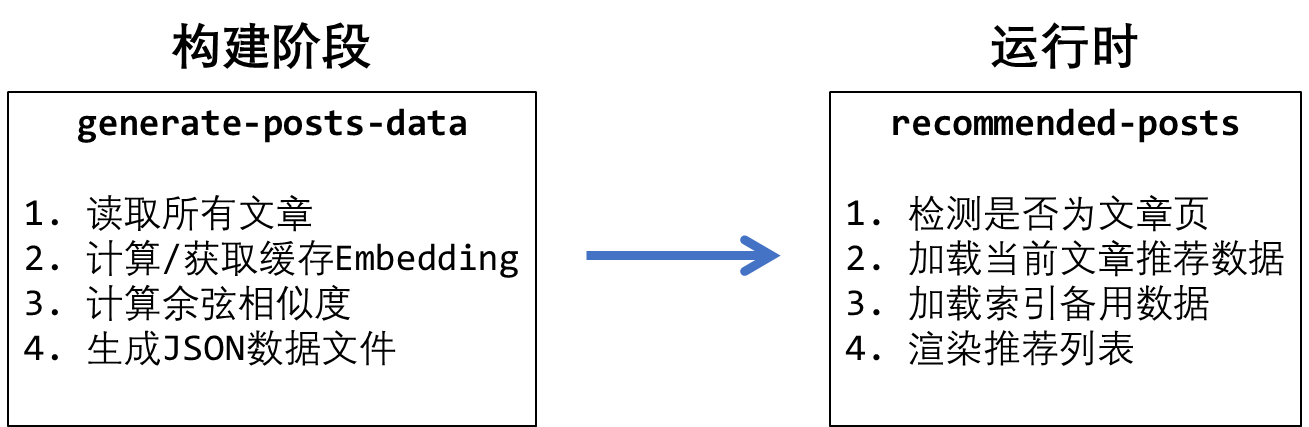
整个推荐系统由两个核心脚本组成:

  1. generate-posts-data.js:Hexo Generator 脚本,在博客构建时运行,负责生成文章数据和计算推荐

  2. recommended-posts.js:前端脚本,负责在页面上展示推荐文章

💡 提示配置与使用折叠区域中提供了完整的脚本代码,可以直接复制使用。

工作流程

工作流程

构建脚本:generate-posts-data.js

这个脚本注册为 Hexo Generator,在每次构建时自动运行。

核心功能

1. 环境变量读取

代码
1
2
3
4
5
6
7
8
9
10
11
12
13
14
15
16
17
18
19
20
21
22
23
24
25
26
27
28
29

function getEnv(key) {

if (process.env[key]) {

return process.env[key];

}

const envPath = path.join(hexo.base_dir, '.env');

if (fs.existsSync(envPath)) {

const envContent = fs.readFileSync(envPath, 'utf-8');

const match = envContent.match(new RegExp(`^${key}=(.*)$`, 'm'));

if (match) {

return match[1].trim();

}

}

return null;

}

支持从环境变量或 .env 文件读取配置,需要的环境变量包括:

OPENAI_API_KEY: OpenAI API 密钥

OPENAI_BASE_URL: API 端点(可选,支持代理)

OPENAI_EMBEDDING_MODEL: Embedding 模型名称

2. 内容预处理

代码
1
2
3
4
5
6
7
8
9
10
11
12
13
14
15
16
17
18
19

function stripFrontMatter(content) {

if (content.startsWith('---')) {

const end = content.indexOf('---', 3);

if (end !== -1) {

return content.substring(end + 3).trim();

}

}

return content;

}

移除文章的 Front Matter,只保留正文内容用于 Embedding 计算。

3. Embedding 获取与缓存

脚本实现了智能缓存机制:

  1. 计算文章内容的 MD5 哈希值

  2. 检查缓存中是否存在相同哈希的 Embedding

  3. 如果缓存命中则复用,否则调用 API 获取新的 Embedding

  4. 将新获取的 Embedding 保存到 embeddings_store/cache.json

这种设计大大减少了 API 调用次数,只有文章内容发生变化时才会重新计算 Embedding。

4. 相似度计算

代码
1
2
3
4
5
6
7
8
9
10
11
12
13
14
15
16
17
18
19
20
21
22
23

function cosineSimilarity(vecA, vecB) {

let dotProduct = 0;

let normA = 0;

let normB = 0;

for (let i = 0; i < vecA.length; i++) {

dotProduct += vecA[i] * vecB[i];

normA += vecA[i] * vecA[i];

normB += vecB[i] * vecB[i];

}

return dotProduct / (Math.sqrt(normA) * Math.sqrt(normB));

}

使用余弦相似度来衡量两篇文章的语义相关性,这是文本相似度计算中最常用的方法。

5. 生成数据文件

脚本会生成两种类型的 JSON 文件:

单篇文章数据 (js/posts-data/{post-path}.json):

1
2
3
4
5
6
7
8
9
10
11
12
13
14
15
16
17
18
19
20
21
22
23

{

"title": "文章标题",

"path": "2024/01/01/post-slug/",

"date": "2024-01-01T00:00:00.000Z",

"categories": ["分类1"],

"tags": ["标签1", "标签2"],

"recommendations": [

{"title": "推荐文章1", "path": "...", "date": "...", "similarity": 0.95},

{"title": "推荐文章2", "path": "...", "date": "...", "similarity": 0.90}

]

}

索引文件 (js/posts-data/index.json):

1
2
3
4
5
6
7
8
9

[

{"title": "文章1", "path": "...", "date": "...", "dataFile": "..."},

{"title": "文章2", "path": "...", "date": "...", "dataFile": "..."}

]

前端脚本:recommended-posts.js

这个脚本在浏览器中运行,负责展示推荐文章。

核心功能

1. 页面类型检测

代码
1
2
3
4
5
6
7
8
9
10
11
12
13
14
15
16
17
18
19
20
21
22
23
24
25
26
27
28
29

function isPostPage() {

const path = window.location.pathname;


// 排除首页、分页、分类、标签、归档等页面

if (path === '/' || /^\/page\/\d+\/?$/.test(path)) return false;

if (path.startsWith('/categories') || path.startsWith('/tags')) return false;

if (path.startsWith('/archives')) return false;


// 检查文章特有元素

const hasArticle = document.querySelector('article[itemtype*="Article"]');

const hasPostClass = document.querySelector('.kratos-page-inner.kr-post');


return hasArticle || hasPostClass;

}

只在文章页面显示推荐阅读,避免在首页和列表页出现。

2. 推荐策略

脚本采用优雅降级策略:

  1. 优先使用预计算推荐:加载当前文章的数据文件,使用其中的 recommendations 字段

  2. 随机补齐:如果推荐数量不足,从索引中随机抽取文章补充

  3. 完全随机降级:如果数据文件不存在,则完全从索引中随机选择

代码
1
2
3
4
5
6
7
8
9
10
11
12
13
14
15
16
17
18
19
20
21

if (postData?.recommendations?.length > 0) {

// 使用预计算推荐 + 随机补齐

const numFromRecommendations = Math.min(postData.recommendations.length, CONFIG.numRecommended - 1);

recommended = postData.recommendations.slice(0, numFromRecommendations);

// ... 随机补齐逻辑

} else if (indexData?.length > 0) {

// 降级:完全随机

const shuffled = shuffleArray(indexData);

recommended = shuffled.slice(0, CONFIG.numRecommended);

}

3. 样式注入

脚本自带完整的 CSS 样式,无需额外引入样式文件:

  • 支持亮色/暗色主题(通过 CSS 变量)

  • 响应式设计,适配移动端

  • 平滑的悬浮动画效果

4. PJAX 支持

代码
1
2
3
4
5
6
7
8
9
10
11
12
13
14
15

function setupPjaxSupport() {

window.addEventListener('pjax:complete', () => {

const existing = document.querySelector('.recommended-posts');

if (existing) existing.remove();

init();

});

}

完美支持 PJAX 局部刷新,在页面切换时自动更新推荐列表。

配置与使用

1. 安装脚本

generate-posts-data.js 放置在 Hexo 项目的 scripts/ 目录下。

recommended-posts.js 放置在 source/js/ 目录下。

在主题中引入 recommended-posts.js,创建或修改博客项目的 _config.Kratos-Rebirth.yml 文件,添加如下配置:

💡 提示:本文博客使用 Kratos-Rebirth 主题,引入部分参考自己的主题进行配置。

generate-posts-data.js
1
2
3
4
5
6
7
8
9
10
11
12
13
14
15
16
17
18
19
20
21
22
23
24
25
26
27
28
29
30
31
32
33
34
35
36
37
38
39
40
41
42
43
44
45
46
47
48
49
50
51
52
53
54
55
56
57
58
59
60
61
62
63
64
65
66
67
68
69
70
71
72
73
74
75
76
77
78
79
80
81
82
83
84
85
86
87
88
89
90
91
92
93
94
95
96
97
98
99
100
101
102
103
104
105
106
107
108
109
110
111
112
113
114
115
116
117
118
119
120
121
122
123
124
125
126
127
128
129
130
131
132
133
134
135
136
137
138
139
140
141
142
143
144
145
146
147
148
149
150
151
152
153
154
155
156
157
158
159
160
161
162
163
164
165
166
167
168
169
170
171
172
173
174
175
176
177
178
179
180
181
182
183
184
185
186
187
188
189
190
191
192
193
194
195
196
197
198
199
200
201
202
203
204
205
206
207
208
209
210
211
212
213
214
215
216
217
218
219
220
221
222
223
224
225
226
227
228
229
230
231
232
233
234
235
236
237
238
239
240
241
242
243
244
245
246
247
248
249
250
251
252
253
254
255
256
257
258
259
260
261
262
263
264
265
266
267
268
269
270
271
272
273
274
275
276
277
278
279
280
281
282
283
284
285
286
287
288
289
290
291
292
293
294
295
296
297
298
299
300
301
302
303
304
305
306
307
308
309
310
311
312
313
314
315
316
317
318
319
320
321
322
323
324
325
326
327
328
329
330
331
332
333
334
335
336
337
338
339
340
341
342
343
344
345
346
347
348
349
350
351
352
353
354
355
356
357
358
359
360
361
362
363
364
365
366
367
368
369
370
371
372
373
374
375
376
377
378
379
380
381
382
383
384
385
386
387
388
389
390
391
392
393
394
395
396
397
398
399
400
401
402
403
404
405
406
407
408
409
410
411
412
413
414
415
416
417
418
419
420
421
422
423
424
425
426
427
428
429
430
431
432
433
434
435
436
437
438
439
440
441
442
443
444
445
446
447
448
449
450
451
452
453
454
455
456
457
458
459
460
461
462
463
464
465
466
467
468
469
470
471
472
473
474
475
476
477
478
479
480
481
482
483
484
485
486
487
488
489
490
491
492
493
494
495
496
497
498
499
500
501

/**

* 生成文章数据 JSON 文件

* 用于推荐阅读功能

* 包含文章内容的 MD5 和 Embedding

* 并计算 Top 5 相关文章

*/


const fs = require('fs');

const path = require('path');

const crypto = require('crypto');

const https = require('https');


// 读取环境变量

function getEnv(key) {

if (process.env[key]) {

return process.env[key];

}

const envPath = path.join(hexo.base_dir, '.env');

if (fs.existsSync(envPath)) {

const envContent = fs.readFileSync(envPath, 'utf-8');

const match = envContent.match(new RegExp(`^${key}=(.*)$`, 'm'));

if (match) {

return match[1].trim();

}

}

return null;

}


// 移除 Front Matter

function stripFrontMatter(content) {

if (content.startsWith('---')) {

const end = content.indexOf('---', 3);

if (end !== -1) {

return content.substring(end + 3).trim();

}

}

return content;

}


// 计算 MD5

function calculateMD5(content) {

return crypto.createHash('md5').update(content).digest('hex');

}


// 计算余弦相似度

function cosineSimilarity(vecA, vecB) {

let dotProduct = 0;

let normA = 0;

let normB = 0;

for (let i = 0; i < vecA.length; i++) {

dotProduct += vecA[i] * vecB[i];

normA += vecA[i] * vecA[i];

normB += vecB[i] * vecB[i];

}

return dotProduct / (Math.sqrt(normA) * Math.sqrt(normB));

}


// 调用 OpenAI API 获取 Embedding

function getEmbedding(text, apiKey, endpoint, model) {

return new Promise((resolve, reject) => {

const baseUrl = endpoint ? endpoint.replace(/\/+$/, '') : 'https://api.openai.com/v1';

const url = new URL(`${baseUrl}/embeddings`);


const postData = JSON.stringify({

input: text,

model: model

});


const options = {

method: 'POST',

headers: {

'Content-Type': 'application/json',

'Authorization': `Bearer ${apiKey}`,

'Content-Length': Buffer.byteLength(postData)

}

};


const requestModule = url.protocol === 'http:' ? require('http') : https;


const req = requestModule.request(url, options, (res) => {

let data = '';

res.on('data', (chunk) => data += chunk);

res.on('end', () => {

if (res.statusCode >= 200 && res.statusCode < 300) {

try {

const parsed = JSON.parse(data);

if (parsed.data && parsed.data.length > 0) {

resolve(parsed.data[0].embedding);

} else {

reject(new Error('Invalid API response: missing embedding data'));

}

} catch (e) {

reject(new Error(`JSON parse error: ${e.message}`));

}

} else {

// 不要在错误信息中包含完整响应,可能包含敏感信息

reject(new Error(`API request failed with status ${res.statusCode}`));

}

});

});


req.on('error', (e) => reject(e));

req.write(postData);

req.end();

});

}


hexo.extend.generator.register('posts-data', async function(locals) {

const log = hexo.log || console;

const apiKey = getEnv('OPENAI_API_KEY');

const endpoint = getEnv('OPENAI_BASE_URL') || getEnv('OPENAI_API_ENDPOINT');

const model = getEnv('OPENAI_EMBEDDING_MODEL');


if (apiKey && !model) {

throw new Error('Generate Posts Data: OPENAI_EMBEDDING_MODEL environment variable is required.');

}


if (!apiKey) {

log.warn('Generate Posts Data: OPENAI_API_KEY usually required for embeddings, but not found. Recommendations will be random.');

}


// 确保存储目录存在

const storeDir = path.join(hexo.base_dir, 'embeddings_store');

if (!fs.existsSync(storeDir)) {

fs.mkdirSync(storeDir);

}


// 加载缓存

const cachePath = path.join(storeDir, 'cache.json');

let cache = {};

if (fs.existsSync(cachePath)) {

try {

cache = JSON.parse(fs.readFileSync(cachePath, 'utf-8'));

} catch (e) {

log.error('Generate Posts Data: Failed to load cache.', e);

}

}


const posts = locals.posts.sort('-date').toArray();

const processedPosts = [];

let cacheUpdated = false;


// 1. 获取/更新 Embeddings

for (const post of posts) {

const rawContent = post.raw || '';

const body = stripFrontMatter(rawContent);

const title = post.title || '(无标题)';

// 组合 Title 和 Body

const contentForEmbedding = `Title: ${title}\n\n${body}`;

// 截断内容

const truncatedContent = contentForEmbedding.slice(0, 30000);

const hash = calculateMD5(truncatedContent);


let embedding = null;


if (cache[post.path] && cache[post.path].hash === hash) {

embedding = cache[post.path].embedding;

} else if (apiKey) {

try {

log.info(`Generating embedding for: ${title}`);

embedding = await getEmbedding(truncatedContent, apiKey, endpoint, model);

cache[post.path] = {

hash: hash,

embedding: embedding

};

cacheUpdated = true;

} catch (e) {

log.error(`Failed to generate embedding for ${title}:`, e.message);

}

}


processedPosts.push({

post: post,

embedding: embedding

});

}


// 保存缓存

if (cacheUpdated) {

fs.writeFileSync(cachePath, JSON.stringify(cache, null, 2));

}


// 2. 计算相似度并生成最终数据

const generatedFiles = [];


// 用于存储所有文章的基本信息(用于回退/随机推荐)

const indexData = [];


for (const item of processedPosts) {

const currentPost = item.post;

const currentEmbedding = item.embedding;

let recommendations = [];


if (currentEmbedding) {

// 计算与所有其他文章的相似度

const candidates = processedPosts

.filter(p => p.post.path !== currentPost.path && p.embedding) // 排除自己且必须有embedding

.map(p => ({

title: p.post.title,

path: p.post.path,

date: p.post.date.toISOString(),

similarity: cosineSimilarity(currentEmbedding, p.embedding)

}))

.sort((a, b) => b.similarity - a.similarity) // 降序

.slice(0, 5); // 取前5


recommendations = candidates;

}


// 构建单篇文章的数据对象

const postData = {

title: currentPost.title || '(无标题)',

path: currentPost.path,

date: currentPost.date.toISOString(),

categories: currentPost.categories?.map(cat => cat.name) || [],

tags: currentPost.tags?.map(tag => tag.name) || [],

recommendations: recommendations // 包含 Top 5

};


// 生成文件路径:将 path 转换为安全的文件名

// 例如 "2024/01/01/my-post/" -> "2024-01-01-my-post.json"

const safeFileName = currentPost.path

.replace(/^\/+|\/+$/g, '') // 移除首尾斜杠

.replace(/\//g, '-') // 替换斜杠为连字符

.replace(/\.html?$/, '') // 移除 .html 后缀

+ '.json';


// 添加到生成文件列表

generatedFiles.push({

path: `js/posts-data/${safeFileName}`,

data: JSON.stringify(postData)

});


// 添加到索引(简化版,用于回退和随机推荐)

indexData.push({

title: postData.title,

path: postData.path,

date: postData.date,

dataFile: safeFileName // 指向单独的数据文件

});

}


// 添加索引文件

generatedFiles.push({

path: 'js/posts-data/index.json',

data: JSON.stringify(indexData)

});


return generatedFiles;

});

recommended-posts.js
1
2
3
4
5
6
7
8
9
10
11
12
13
14
15
16
17
18
19
20
21
22
23
24
25
26
27
28
29
30
31
32
33
34
35
36
37
38
39
40
41
42
43
44
45
46
47
48
49
50
51
52
53
54
55
56
57
58
59
60
61
62
63
64
65
66
67
68
69
70
71
72
73
74
75
76
77
78
79
80
81
82
83
84
85
86
87
88
89
90
91
92
93
94
95
96
97
98
99
100
101
102
103
104
105
106
107
108
109
110
111
112
113
114
115
116
117
118
119
120
121
122
123
124
125
126
127
128
129
130
131
132
133
134
135
136
137
138
139
140
141
142
143
144
145
146
147
148
149
150
151
152
153
154
155
156
157
158
159
160
161
162
163
164
165
166
167
168
169
170
171
172
173
174
175
176
177
178
179
180
181
182
183
184
185
186
187
188
189
190
191
192
193
194
195
196
197
198
199
200
201
202
203
204
205
206
207
208
209
210
211
212
213
214
215
216
217
218
219
220
221
222
223
224
225
226
227
228
229
230
231
232
233
234
235
236
237
238
239
240
241
242
243
244
245
246
247
248
249
250
251
252
253
254
255
256
257
258
259
260
261
262
263
264
265
266
267
268
269
270
271
272
273
274
275
276
277
278
279
280
281
282
283
284
285
286
287
288
289
290
291
292
293
294
295
296
297
298
299
300
301
302
303
304
305
306
307
308
309
310
311
312
313
314
315
316
317
318
319
320
321
322
323
324
325
326
327
328
329
330
331
332
333
334
335
336
337
338
339
340
341
342
343
344
345
346
347
348
349
350
351
352
353
354
355
356
357
358
359
360
361
362
363
364
365
366
367
368
369
370
371
372
373
374
375
376
377
378
379
380
381
382
383
384
385
386
387
388
389
390
391
392
393
394
395
396
397
398
399
400
401
402
403
404
405
406
407
408
409
410
411
412
413
414
415
416
417
418
419
420
421
422
423
424
425
426
427
428
429
430
431
432
433
434
435
436
437
438
439
440
441
442
443
444
445
446
447
448
449
450
451
452
453
454
455
456
457
458
459
460
461
462
463
464
465
466
467
468
469
470
471
472
473
474
475
476
477
478
479
480
481
482

/**
* 推荐阅读功能
* 在文章页面随机展示推荐文章
*/
(function() {
'use strict';

// 配置项
const CONFIG = {
numRecommended: 5, // 推荐文章数量
containerSelector: '.post-navigation', // 插入位置(在导航后面)
fallbackSelector: '.kratos-entry-footer', // 备用插入位置
dataBasePath: '/js/posts-data/', // 文章数据基础路径
indexPath: '/js/posts-data/index.json' // 索引文件路径
};

// 注入样式
function injectStyles() {
const style = document.createElement('style');
style.textContent = `
.recommended-posts {
background: var(--kr-theme-card-bg, #ffffffcc);
border-radius: 8px;
padding: 20px 25px;
margin: 20px 0;
box-shadow: 0 2px 12px rgba(0,0,0,0.08);
transition: all 0.3s ease;
overflow: hidden;
}

.recommended-posts:hover {
box-shadow: 0 4px 20px rgba(0,0,0,0.12);
transform: translateY(-2px);
}

.recommended-posts-title {
display: flex;
align-items: center;
gap: 10px;
font-size: 1.1rem;
font-weight: 600;
color: var(--kr-theme-text, #000);
margin-bottom: 15px;
padding-bottom: 12px;
border-bottom: 2px solid var(--kr-theme-link, #1e8cdb);
}

.recommended-posts-title i {
color: var(--kr-theme-link, #1e8cdb);
font-size: 1.2rem;
}

.recommended-posts-list {
list-style: none;
padding: 0;
margin: 0;
display: grid;
gap: 10px;
overflow: hidden;
width: 100%;
}

.recommended-posts-item {
position: relative;
padding-left: 0;
transition: all 0.2s ease;
overflow: hidden;
min-width: 0;
max-width: 100%;
}

.recommended-posts-item a {
display: flex;
align-items: center;
gap: 12px;
padding: 12px 15px;
background: var(--kr-theme-info-bg, #e0e0e0aa);
border-radius: 6px;
color: var(--kr-theme-text, #000);
text-decoration: none;
transition: all 0.25s ease;
border-left: 3px solid transparent;
overflow: hidden;
min-width: 0;
}

.recommended-posts-item a:hover {
background: var(--kr-theme-link, #1e8cdb);
color: #fff;
border-left-color: var(--kr-theme-link-hover, #6ec3f5);
transform: translateX(5px);
}

.recommended-posts-item a i {
font-size: 0.9rem;
opacity: 0.8;
flex-shrink: 0;
}

.recommended-posts-item a:hover i {
opacity: 1;
}

.recommended-posts-item .post-title-text {
flex: 1;
min-width: 0;
overflow: hidden;
text-overflow: ellipsis;
white-space: nowrap;
}

.recommended-posts-item .post-date {
font-size: 0.8rem;
opacity: 0.7;
flex-shrink: 0;
}

.recommended-posts-loading {
text-align: center;
padding: 20px;
color: var(--kr-theme-text-alt, #666);
}

.recommended-posts-empty {
text-align: center;
padding: 15px;
color: var(--kr-theme-text-alt, #666);
font-style: italic;
}

/* 响应式适配 */
@media (max-width: 768px) {
.recommended-posts {
padding: 15px 18px;
margin: 15px 0;
}

.recommended-posts-item a {
padding: 10px 12px;
gap: 8px;
}

.recommended-posts-item .post-title-text {
font-size: 0.9rem;
}

.recommended-posts-item .post-date {
display: none;
}
}
`;
document.head.appendChild(style);
}

// 获取当前页面路径
function getCurrentPath() {
return window.location.pathname;
}

// Fisher-Yates 洗牌算法
function shuffleArray(array) {
const shuffled = [...array];
for (let i = shuffled.length - 1; i > 0; i--) {
const j = Math.floor(Math.random() * (i + 1));
[shuffled[i], shuffled[j]] = [shuffled[j], shuffled[i]];
}
return shuffled;
}

// 格式化日期
function formatDate(dateStr) {
const date = new Date(dateStr);
const year = date.getFullYear();
const month = String(date.getMonth() + 1).padStart(2, '0');
const day = String(date.getDate()).padStart(2, '0');
return `${year}-${month}-${day}`;
}

// 创建推荐阅读容器
function createContainer() {
const container = document.createElement('div');
container.className = 'recommended-posts';
container.innerHTML = `
<div class="recommended-posts-title">
<i class="fa fa-star"></i>
<span>推荐阅读</span>
</div>
<div class="recommended-posts-loading">
<i class="fa fa-spinner fa-spin"></i> 加载中...
</div>
`;
return container;
}

// 将路径转换为数据文件名
function pathToDataFileName(path) {
return path
.replace(/^\/+|\/+$/g, '') // 移除首尾斜杠
.replace(/\//g, '-') // 替换斜杠为连字符
.replace(/\.html?$/, '') // 移除 .html 后缀
+ '.json';
}

// 渲染推荐文章列表
function renderPosts(container, postData, indexData) {
const currentPath = getCurrentPath();
const normalizedCurrentPath = currentPath.replace(/^\//, '');

let recommended = [];

// 1. 尝试使用当前文章的预计算推荐
if (postData && postData.recommendations && postData.recommendations.length > 0) {
// 从 recommendations 中取前 numRecommended - 1 个
const numFromRecommendations = Math.min(postData.recommendations.length, CONFIG.numRecommended - 1);
recommended = postData.recommendations.slice(0, numFromRecommendations);

// 从索引中随机补齐剩余位置
if (indexData && indexData.length > 0) {
const selectedPaths = new Set(recommended.map(p => p.path));
selectedPaths.add(normalizedCurrentPath);
selectedPaths.add(currentPath);

const remaining = CONFIG.numRecommended - recommended.length;
if (remaining > 0) {
const pool = indexData.filter(p => !selectedPaths.has(p.path));
const shuffled = shuffleArray(pool);
const extra = shuffled.slice(0, remaining);
recommended = recommended.concat(extra);
}
}
} else if (indexData && indexData.length > 0) {
// 2. 降级方案:从索引中随机抽取
const filteredPosts = indexData.filter(post => {
const postPath = post.path.startsWith('/') ? post.path : '/' + post.path;
return postPath !== currentPath && !currentPath.endsWith(post.path);
});

const shuffled = shuffleArray(filteredPosts);
recommended = shuffled.slice(0, CONFIG.numRecommended);
}

// 清除加载状态
const loading = container.querySelector('.recommended-posts-loading');
if (loading) loading.remove();

// 如果没有推荐文章
if (recommended.length === 0) {
const empty = document.createElement('div');
empty.className = 'recommended-posts-empty';
empty.textContent = '暂无推荐文章';
container.appendChild(empty);
return;
}

// 创建列表
const list = document.createElement('ul');
list.className = 'recommended-posts-list';

recommended.forEach(post => {
const item = document.createElement('li');
item.className = 'recommended-posts-item';

const link = document.createElement('a');
link.href = post.path.startsWith('/') ? post.path : '/' + post.path;
link.title = post.title;

link.innerHTML = `
<i class="fa fa-bookmark-o"></i>
<span class="post-title-text">${post.title}</span>
<span class="post-date">${formatDate(post.date)}</span>
`;

item.appendChild(link);
list.appendChild(item);
});

container.appendChild(list);

// 调整标题字体大小以适应容器
adjustTitleFontSizes(container);
}

// 调整标题字体大小
function adjustTitleFontSizes(container) {
const titleElements = container.querySelectorAll('.post-title-text');
const minFontSize = 0.75; // rem,最小字体
const defaultFontSize = 1; // rem,默认字体
const step = 0.05; // 每次缩小的步长

titleElements.forEach(titleEl => {
// 保持 overflow hidden 用于省略号
titleEl.style.overflow = 'hidden';
titleEl.style.textOverflow = 'ellipsis';
titleEl.style.whiteSpace = 'nowrap';

// 重置为默认字体
titleEl.style.fontSize = defaultFontSize + 'rem';

let currentSize = defaultFontSize;

// 使用 scrollWidth 和 clientWidth 比较检测溢出
// 在 overflow: hidden 下,scrollWidth 仍然会返回内容的完整宽度
while (titleEl.scrollWidth > titleEl.clientWidth && currentSize > minFontSize) {
currentSize -= step;
titleEl.style.fontSize = currentSize.toFixed(2) + 'rem';
}
});
}

// 插入到页面
function insertContainer(container) {
// 优先尝试在 post-navigation 后面插入
let target = document.querySelector(CONFIG.containerSelector);
if (target) {
target.after(container);
return true;
}

// 备用:在 footer 后面插入
target = document.querySelector(CONFIG.fallbackSelector);
if (target) {
target.after(container);
return true;
}

// 最后尝试:在 article 结尾插入
const article = document.querySelector('article');
if (article) {
article.appendChild(container);
return true;
}

return false;
}

// 加载当前文章的数据文件
async function loadCurrentPostData() {
try {
const siteRoot = window.kr?.siteRoot || '/';
const currentPath = getCurrentPath();
const dataFileName = pathToDataFileName(currentPath);
const dataUrl = siteRoot.replace(/\/$/, '') + CONFIG.dataBasePath + dataFileName;

const response = await fetch(dataUrl);
if (!response.ok) {
return null; // 文件不存在是正常情况,静默返回
}
return await response.json();
} catch (error) {
console.warn('[推荐阅读] 无法加载当前文章数据:', error);
return null;
}
}

// 加载索引文件(用于回退和随机推荐)
async function loadIndexData() {
try {
const siteRoot = window.kr?.siteRoot || '/';
const indexUrl = siteRoot.replace(/\/$/, '') + CONFIG.indexPath;

const response = await fetch(indexUrl);
if (!response.ok) {
throw new Error(`HTTP ${response.status}`);
}
return await response.json();
} catch (error) {
console.warn('[推荐阅读] 无法加载索引数据:', error);
return null;
}
}

// 检查是否为文章页面(非首页、非列表页)
function isPostPage() {
const path = window.location.pathname;

// 排除首页
if (path === '/' || path === '/index.html') {
return false;
}

// 排除分页页面 (如 /page/2/)
if (/^\/page\/\d+\/?$/.test(path)) {
return false;
}

// 排除分类页面
if (path.startsWith('/categories') || path.startsWith('/category')) {
return false;
}

// 排除标签页面
if (path.startsWith('/tags') || path.startsWith('/tag')) {
return false;
}

// 排除归档页面
if (path.startsWith('/archives')) {
return false;
}

// 排除关于页面等独立页面(可根据需要调整)
if (path === '/about/' || path === '/about') {
return false;
}

// 检查是否存在文章特有元素
const hasArticle = document.querySelector('article[itemtype*="Article"]') !== null;
const hasPostClass = document.querySelector('.kratos-page-inner.kr-post') !== null;
const hasPostContent = document.querySelector('.kratos-hentry') !== null;

return hasArticle || hasPostClass || hasPostContent;
}

// 主初始化函数
async function init() {
// 仅在文章页面执行
if (!isPostPage()) {
return;
}

// 注入样式
injectStyles();

// 创建容器并插入
const container = createContainer();
if (!insertContainer(container)) {
console.warn('[推荐阅读] 无法找到合适的插入位置');
return;
}

// 并行加载当前文章数据和索引
const [postData, indexData] = await Promise.all([
loadCurrentPostData(),
loadIndexData()
]);

// 渲染推荐文章
if (postData || (indexData && indexData.length > 0)) {
renderPosts(container, postData, indexData);

// 监听窗口大小变化,重新调整字体
let resizeTimeout;
window.addEventListener('resize', () => {
clearTimeout(resizeTimeout);
resizeTimeout = setTimeout(() => {
adjustTitleFontSizes(container);
}, 100);
});
} else {
const loading = container.querySelector('.recommended-posts-loading');
if (loading) {
loading.innerHTML = '<span class="recommended-posts-empty">暂无推荐文章</span>';
}
}
}

// PJAX 支持:页面更新后重新初始化
function setupPjaxSupport() {
window.addEventListener('pjax:complete', () => {
// 移除旧的推荐阅读区块
const existing = document.querySelector('.recommended-posts');
if (existing) existing.remove();

// 重新初始化
init();
});
}

// 启动
if (document.readyState === 'loading') {
document.addEventListener('DOMContentLoaded', () => {
init();
setupPjaxSupport();
});
} else {
init();
setupPjaxSupport();
}
})();


引入示例
1
2
3
4
additional_injections:
after_footer: |
<!-- 推荐阅读功能 -->
<script defer src="/js/recommended-posts.js"></script>

2. 配置环境变量

创建 .env 文件:

1
2
3
4
5
6
7

OPENAI_API_KEY=sk-your-api-key

OPENAI_BASE_URL=https://api.openai.com/v1

OPENAI_EMBEDDING_MODEL=model-id

注意:将 .envembeddings_store/ 添加到 .gitignore,避免泄露密钥。

3. 构建博客

1
2
3

hexo clean && hexo generate

首次构建时会为所有文章生成 Embedding,可能需要一些时间。后续构建会使用缓存,只对修改过的文章重新计算。

对于使用Github Action进行自动部署的用户,需要在Action中完成对缓存文件的提交才能生效,否则每次构建都会重新计算所有文章的 Embedding。也可以选择在本地构建后,将生成的缓存文件提交到仓库中。

4. GitHub Actions 自动化配置(可选)

如果你使用 GitHub Actions 进行自动部署,可以按以下步骤配置:

配置 Repository Secrets

在 GitHub 仓库的 Settings → Secrets and variables → Actions 中添加以下 Secrets:

  • OPENAI_API_KEY:OpenAI API 密钥
  • OPENAI_BASE_URL:API 端点(可选,默认为 https://api.openai.com/v1
  • OPENAI_EMBEDDING_MODEL:Embedding 模型名称

更新 Workflow 文件

在你的 GitHub Actions workflow 文件中,为构建步骤添加环境变量:

1
2
3
4
5
6
7
8
- name: Build Hexo
env:
OPENAI_API_KEY: ${{ secrets.OPENAI_API_KEY }}
OPENAI_BASE_URL: ${{ secrets.OPENAI_BASE_URL }}
OPENAI_EMBEDDING_MODEL: ${{ secrets.OPENAI_EMBEDDING_MODEL }}
run: |
npx hexo clean
npx hexo generate

缓存持久化(推荐)

为了避免每次构建都重新计算所有 Embedding,建议在 workflow 中添加缓存提交步骤:

1
2
3
4
5
6
7
- name: Commit embedding cache
run: |
git config --local user.email "github-actions[bot]@users.noreply.github.com"
git config --local user.name "github-actions[bot]"
git add embeddings_store/cache.json || true
git diff --staged --quiet || git commit -m "chore: update embedding cache [skip ci]"
git push || true

提示[skip ci] 标记可以避免缓存提交触发新的构建。

Embedding模型选择(仅供参考)

推荐OpenRouter的qwen/qwen3-embedding-8b模型,1M输入仅需$0.01,性价比极高。

效果展示

推荐阅读区块会自动插入到文章导航区域之后,展示风格如下:

  • ⭐ 标题图标,突出展示

  • 📅 显示文章日期

  • 🔖 优雅的列表样式

  • ✨ 悬浮时的交互动画

技术亮点

  1. 语义理解:基于 Embedding 的相似度计算能够理解文章的语义内容,比基于标签/分类的推荐更加精准

  2. 增量计算:缓存机制确保只对修改过的文章重新计算,节省 API 调用成本

  3. 优雅降级:即使没有配置 API,也能通过随机推荐提供基本功能

  4. 零依赖前端:前端脚本不依赖任何框架,体积小巧

  5. 主题适配:通过 CSS 变量自动适配主题样式,仅在Kratos-Rebirth主题下进行测试。

总结

通过这两个脚本的配合,为 Hexo 博客实现了一个基于 AI 的智能推荐系统。它在构建时预计算所有推荐关系,运行时只需加载 JSON 数据,既保证了推荐质量,又不会影响页面加载性能。

希望这个方案能够帮助你提升博客的用户体验!如有问题欢迎在评论区讨论。

分享
分享提示信息